

Introduction
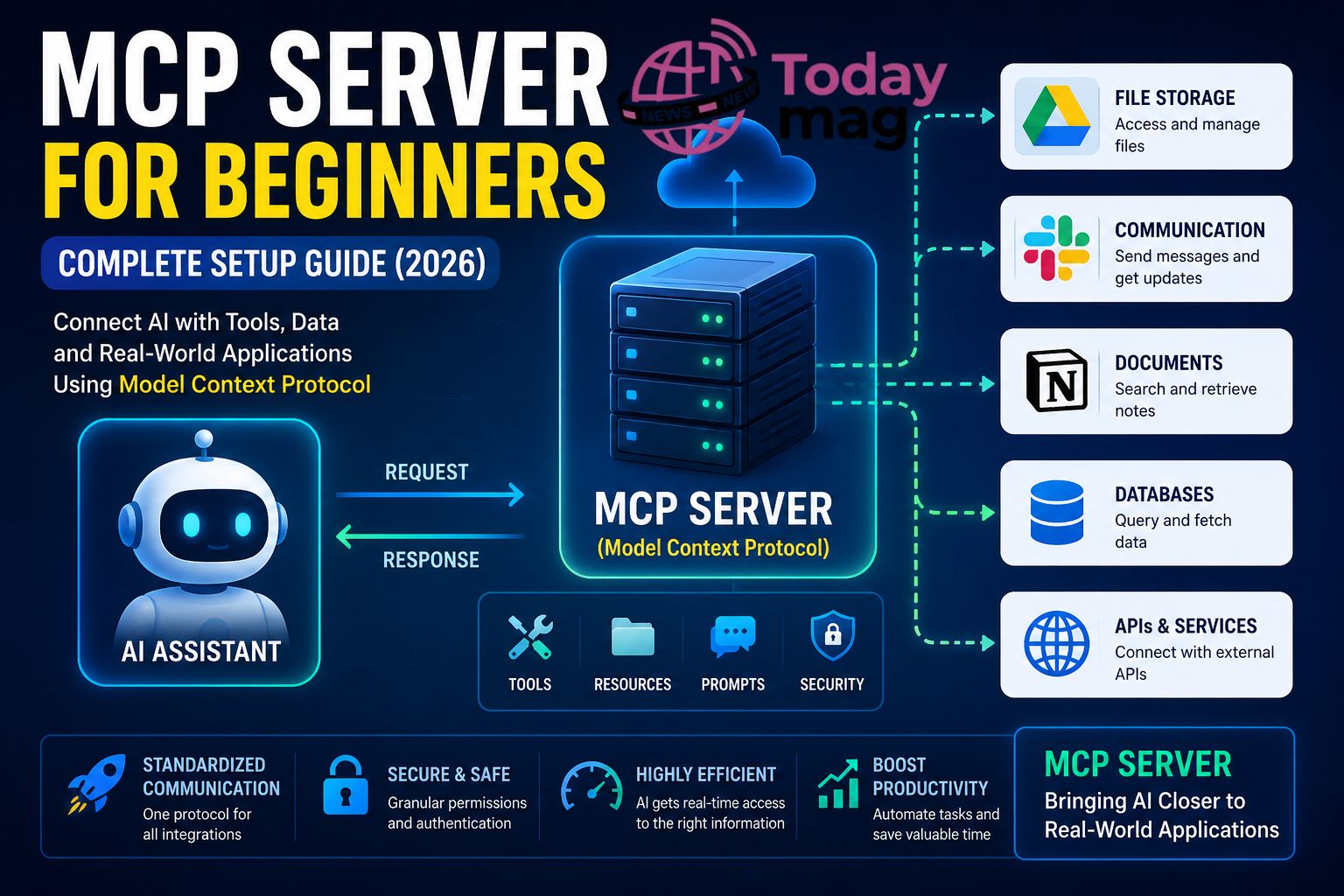
MCP Server for Beginners Artificial intelligence has evolved rapidly over the past few years. Instead of simply answering questions, modern AI assistants can now connect with apps, access files, search databases, and complete complex tasks. One technology making this possible is the MCP Server.
If you’ve recently heard developers talking about MCP servers and wondered what they actually do, you’re not alone. Although the term sounds technical, the concept is easier to understand than most people think.
In this beginner-friendly guide, you’ll learn what an MCP server is, how it works, why it’s becoming an important part of AI development in 2026, and how you can start using one even without advanced programming experience.
Whether you’re a developer, content creator, business owner, or simply curious about AI, this guide explains everything in plain English.
MCP Server Bio Table (2026)
| Attribute | Details |
|---|---|
| Technology Name | MCP Server |
| Full Form | Model Context Protocol Server |
| Category | Artificial Intelligence (AI) |
| Type | Open Communication Protocol |
| Introduced | 2024 |
| Purpose | Connect AI assistants with external tools, apps, databases, and files |
| Primary Function | Enables secure communication between AI models and real-world applications |
| Works With | AI assistants, IDEs, APIs, databases, cloud storage, productivity tools |
| Supported Resources | Files, PDFs, APIs, SQL databases, Git repositories, cloud services |
| Programming Languages | Python, JavaScript, TypeScript, Go, Rust (depending on implementation) |
| Security Features | Authentication, authorization, encrypted communication, permission controls |
| Common Use Cases | AI coding assistants, workflow automation, document search, business productivity |
| Advantages | Standardized integration, scalable, secure, reusable connections |
| Limitations | Requires compatible AI clients and proper configuration |
| Best For | Developers, businesses, AI enthusiasts, researchers, automation engineers |
| Current Status (2026) | Rapidly growing AI integration standard |
| Official Website | https://modelcontextprotocol.io |
| License | Open Standard |
What Is an MCP Server?
An MCP Server is software that allows AI assistants to securely communicate with external tools, databases, applications, and services.
MCP stands for Model Context Protocol, an open standard that helps AI models interact with different systems using one common language.
Think of it like this:
Imagine an AI assistant is a talented employee. Without access to company systems, it can only answer general questions. Once connected through an MCP server, it can:
- Read documents
- Search company databases
- Access calendars
- Manage files
- Query APIs
- Retrieve project information
- Automate repetitive tasks
Instead of building a separate connection for every application, developers create one MCP server that exposes tools in a standardized way.
Why Was MCP Created?
Before MCP, connecting AI to software was often complicated.
Developers needed to build custom integrations for every application.
For example:
- Google Drive required one API.
- GitHub required another.
- Slack required different authentication.
- Notion had its own API.
- Databases all worked differently.
This created unnecessary complexity.
MCP solves this by giving AI systems one consistent method for discovering tools and requesting information.
As more AI assistants adopt MCP, developers can build integrations once and reuse them across multiple AI platforms.
How Does an MCP Server Work?
An MCP server sits between an AI model and external resources.
The process usually looks like this:
- A user asks the AI to complete a task.
- The AI recognizes that external information is needed.
- It contacts an MCP server.
- The server lists available tools.
- The AI chooses the correct tool.
- The server retrieves the requested information.
- Results are sent back to the AI.
- The AI generates a helpful response.
This entire process usually happens within seconds.
Simple Example
Suppose you ask:
“Show me yesterday’s sales report.”
Without MCP:
The AI cannot access your business files.
With MCP:
The AI contacts the sales-report tool through the MCP server, retrieves the data, and summarizes it for you.
The user experiences a natural conversation while the server handles all technical communication behind the scenes.
Key Components of an MCP Server
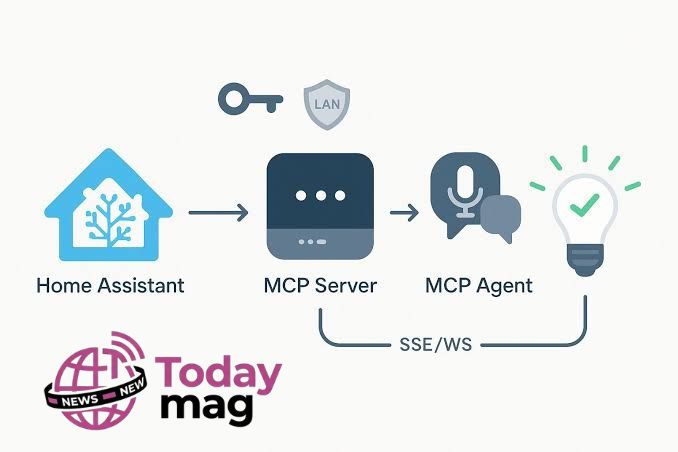
An MCP server typically includes several important components.
Tools
These perform actions.
Examples include:
- Search documents
- Send emails
- Read databases
- Create calendar events
- Generate reports
Resources
Resources provide information instead of actions.
Examples:
- PDF files
- Notes
- Databases
- Documentation
- Knowledge bases
Prompts
Some MCP servers include reusable prompts that help AI perform specialized tasks consistently.
Authentication
Security is critical.
Most MCP servers require authentication before allowing access to sensitive information.
This helps protect private data while giving AI controlled permissions.
Benefits of Using an MCP Server
MCP servers provide several important advantages.
Easier AI Integration
Developers no longer need dozens of custom integrations.
Better Productivity
AI assistants can complete real work instead of only answering questions.
Standardized Communication
Every compatible application follows the same protocol.
Improved Security
Organizations decide exactly which tools AI can access.
Future-Proof Development
As more AI platforms adopt MCP, existing integrations remain useful without major rewrites.
Who Should Learn About MCP?
MCP isn’t only for software engineers.
It can also benefit:
- AI enthusiasts
- Content creators
- Freelancers
- Startup founders
- Students
- Business owners
- Automation specialists
- IT administrators
Anyone interested in modern AI workflows will likely encounter MCP as AI tools continue to evolve.
How to Set Up Your First MCP Server
The good news is that you don’t need to build an MCP server from scratch. Many AI platforms and open-source communities already provide ready-made MCP servers that you can install and configure within minutes.
While the exact setup process depends on the tool you’re using, the overall workflow is very similar.
Step 1: Choose an MCP-Compatible AI Client
First, you’ll need an AI application that supports the Model Context Protocol (MCP).
Some AI clients allow you to connect external MCP servers directly, giving the AI access to files, databases, APIs, and productivity tools.
Choose a client that matches your needs, whether you’re using AI for coding, writing, research, or business automation.
Step 2: Install an MCP Server
After selecting your AI client, install an MCP server.
There are MCP servers available for many popular services, including:
- File systems
- Git repositories
- SQL databases
- Google Drive
- Slack
- Notion
- GitHub
- Email services
- Custom APIs
Each server specializes in connecting AI with a particular service.
Step 3: Configure Permissions
Security is one of MCP’s biggest strengths.
Before an AI assistant can access your data, you’ll usually need to grant permission.
Depending on the service, this may involve:
- Logging into your account
- Generating an API key
- Setting access permissions
- Choosing which folders or databases the AI can use
Always follow the principle of least privilege only grant access to the resources the AI actually needs.
Step 4: Connect the Server
Once configured, connect the MCP server to your AI client.
The client will detect the available tools and resources automatically.
For example, it may discover tools such as:
- Search documents
- Read project files
- Create tasks
- Query a database
- Fetch customer information
These tools become available whenever the AI needs them.
Step 5: Start Using Natural Language
After setup, you don’t need to memorize commands.
Simply ask questions naturally, such as:
- “Find my latest marketing report.”
- “Summarize today’s support tickets.”
- “List unfinished tasks from my project.”
- “Search our documentation for API authentication.”
The AI decides when to use the MCP server and returns the results in plain language.
Popular Uses of MCP Servers
One reason MCP is growing quickly is its flexibility. It works across many industries and workflows.
1. Software Development
Developers use MCP to:
- Search code repositories
- Review pull requests
- Read documentation
- Generate code
- Debug applications
This saves time by reducing manual searching.
2. Business Automation
Companies connect AI with internal systems to:
- Retrieve reports
- Manage customer data
- Answer employee questions
- Create summaries
- Automate repetitive tasks
This improves efficiency while keeping data under company control.
3. Content Creation
Writers and marketers can connect AI to:
- Research notes
- Brand guidelines
- Content calendars
- Knowledge bases
- SEO documents
Instead of uploading files repeatedly, the AI can access approved resources directly.
4. Customer Support
Support teams use MCP to allow AI assistants to:
- Search help centers
- Access product documentation
- Retrieve customer records
- Suggest solutions faster
Customers receive more accurate and consistent responses.
5. Personal Productivity
Individuals can connect AI to:
- Personal notes
- Task managers
- Calendars
- Local files
- Research folders
This creates a personalized AI assistant that understands your own information.
Common Beginner Mistakes
Many new users make avoidable mistakes when starting with MCP.
Connecting Too Many Tools
Adding every available integration can make your setup harder to manage.
Start with one or two tools and expand later.
Ignoring Security Settings
Never give an AI assistant unrestricted access to sensitive data.
Review permissions carefully before connecting any service.
Using Outdated Servers
Always keep your MCP server updated to receive the latest features, bug fixes, and security improvements.
Expecting Instant Automation
An MCP server provides access to tools it doesn’t automatically perform every task.
You’ll still need to guide the AI with clear instructions.
Is MCP Secure?
Security depends on how the server is configured.
A properly configured MCP server typically includes:
- Authentication
- Permission controls
- Encrypted communication
- Logging and auditing
- Access restrictions
However, users should avoid connecting confidential business systems without understanding the available security options.
For organizations, it’s often best to test MCP in a controlled environment before deploying it widely.
Why MCP Matters in 2026
The AI industry is moving toward assistants that can do more than generate text.
Instead of simply answering questions, AI is becoming capable of interacting with software, retrieving real-time information, and completing tasks across multiple applications.
MCP provides the standardized communication layer that makes this possible.
As adoption grows, it’s likely to become a core technology behind many AI-powered workflows, making it a valuable concept for developers, businesses, and everyday users to understand.
MCP Server vs API: What’s the Difference?
Many beginners confuse MCP Servers with traditional APIs. While both allow software to communicate, they serve different purposes.
| Feature | MCP Server | Traditional API |
|---|---|---|
| Purpose | Connects AI models with tools and data | Connects one application to another |
| Communication | Uses the Model Context Protocol | Uses REST, GraphQL, SOAP, or similar protocols |
| AI Friendly | Yes | Not always |
| Tool Discovery | Automatic | Manual implementation |
| Ease of Integration | Standardized across supported tools | Different for every service |
In simple terms, an API is a communication method, while an MCP Server acts as a bridge that lets AI models discover and use multiple tools through one common standard.
MCP Server vs AI Plugins
Another common question is whether MCP replaces AI plugins.
The answer is not exactly.
AI plugins are usually built for a specific AI platform. If you switch platforms, you may need a completely different integration.
An MCP Server, on the other hand, follows an open standard. As more AI applications support MCP, the same server can potentially work across multiple compatible clients with minimal changes.
This makes MCP a more scalable solution for developers and businesses.
Real-World Examples of MCP Servers
Here are a few practical scenarios where MCP servers make AI more useful.
Software Development
A developer asks:
“Find the bug introduced in yesterday’s commit.”
The AI searches the connected Git repository through an MCP server and highlights the relevant code changes.
Marketing Team
A marketer asks:
“Summarize this month’s campaign performance.”
The AI retrieves analytics data, combines information from reports, and generates a concise summary.
Customer Support
A support agent asks:
“Show me previous conversations with this customer.”
The AI securely retrieves the support history from the company’s database before generating a response.
Content Creation
A blogger asks:
“Find all my articles about AI automation.”
The AI searches connected folders and knowledge bases, saving time and avoiding duplicate work.
Advantages of Learning MCP Today
If you’re interested in AI, learning MCP now offers several long-term benefits.
- Future-proof technical knowledge
- Better understanding of modern AI workflows
- Faster automation of repetitive tasks
- Easier integration with business software
- Improved productivity
- Growing demand for AI integration skills
- Useful for both developers and non-developers
As AI continues to evolve, understanding MCP can become a valuable professional skill.
Frequently Asked Questions (FAQs)
What does MCP stand for?
MCP stands for Model Context Protocol, an open standard that allows AI models to communicate with external tools, services, and data sources.
Is an MCP Server free?
Many open-source MCP servers are free to use. However, some enterprise solutions or cloud-hosted services may require a paid subscription.
Do I need coding experience?
Not necessarily.
Many modern AI applications offer beginner-friendly setup processes. However, developers can customize MCP servers further using programming languages such as Python or JavaScript.
Can MCP work with local files?
Yes.
Many MCP servers allow AI assistants to securely access local folders, documents, PDFs, spreadsheets, and other files—provided you grant permission.
Is MCP only for developers?
No.
Business owners, writers, researchers, students, marketers, and freelancers can also benefit from AI assistants connected through MCP.
Is MCP secure?
When configured correctly, MCP can be very secure. Always use trusted servers, keep them updated, and grant only the permissions that are necessary.
The Future of MCP
The rapid growth of AI assistants has created a need for standardized communication between models and external software.
Industry experts expect MCP adoption to continue increasing because it simplifies integration while improving consistency and security.
Future MCP servers may support:
- Smarter AI automation
- Better enterprise integrations
- More secure permission management
- Faster tool discovery
- Expanded compatibility with cloud services
- Improved collaboration between multiple AI agents
As AI becomes part of everyday work, MCP is likely to play an increasingly important role behind the scenes.
Final Thoughts
The Model Context Protocol (MCP) is changing the way AI systems interact with the digital world. Instead of limiting AI to text generation, MCP enables assistants to securely access tools, files, databases, and business applications through a standardized approach.
Whether you’re a developer building AI-powered software or a business professional looking to automate workflows, understanding how MCP servers work can help you stay ahead of the rapidly evolving AI landscape.
Although the technology is still developing, its growing adoption suggests that MCP will become one of the foundational standards for next-generation AI applications. Learning it today is a smart investment for anyone interested in the future of artificial intelligenc
